Best Desk Lamps for a Home Office in 2026
This article contains affiliate links. As an Amazon Associate I earn from qualifying purchases.
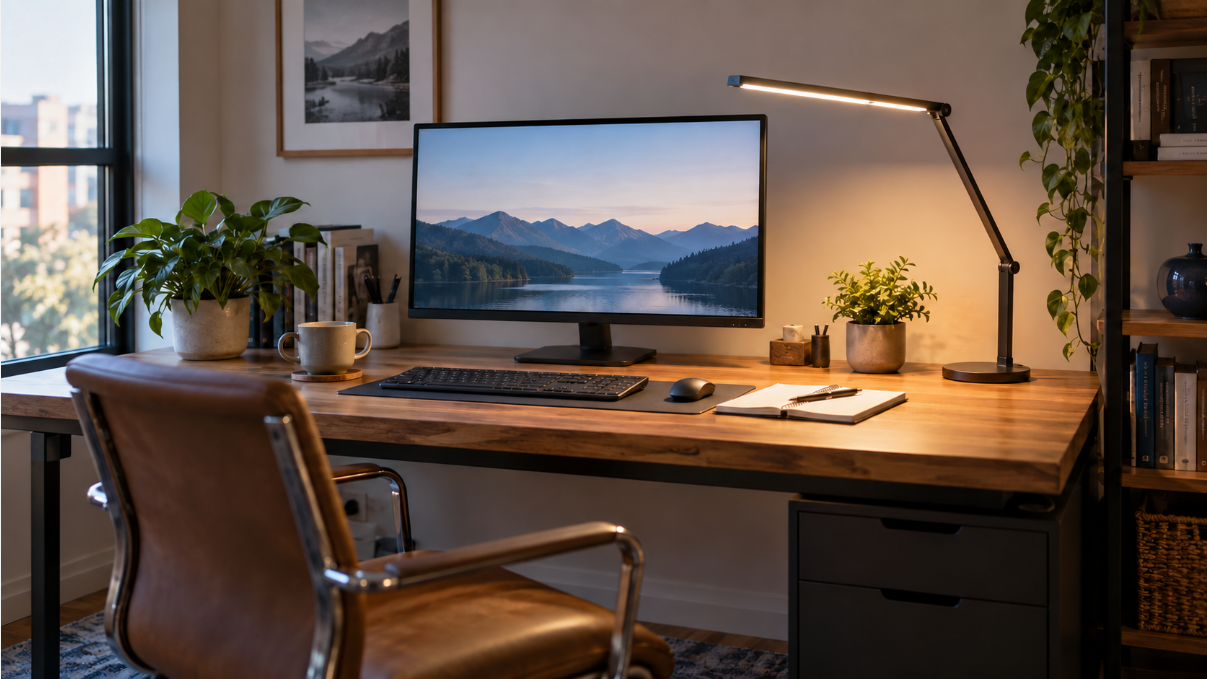
The best desk lamps for a home office should illuminate your keyboard, notes, and work surface without creating a bright reflection on your monitor. The right choice depends less on decorative style and more on three practical questions: how wide your desk is, whether you can use a clamp, and whether you need broad ambient light or concentrated task light.
Before adding more light, fix persistent reflections with our guide to reducing monitor glare in a home office. A brighter lamp cannot fully compensate for a poor screen angle or direct window reflection.
Research-based comparison, not a hands-on test. Choose the mounting layout first, then check reach, controls and the exact offer. We have not measured these lamps’ brightness, glare or durability.
Before choosing a lamp, work out how much light your tasks need. Our home office lighting and lux guide explains how room light, daylight, and task lighting work together and why a lamp’s advertised lux figure does not describe the entire room.
Quick Picks
Start with the mounting position you can actually use. Open a model’s fit notes and existing buying link below.
A suitable, clear desk edge
Compare a clamp design. Check thickness, underside obstructions, material and the lamp’s own instructions first.
Surface space for a base
Compare a freestanding design when clamping is unsuitable. Check base stability and reach in your actual desk layout.
Comparison Table
| Checked model and ASIN | Layout to compare | Reason to pause before buying |
|---|---|---|
| Micomlan FDDL03 — B0BNHNG5CY | Clamp; articulated task and ambient-light bars | Confirm the clamp range, arm clearance and access to controls. |
| Syrinx YG605 — B0GF1GYKW5 | Clamp; wider dual-head arrangement | A seller’s coverage width does not establish useful illuminance across your paper and keyboard. |
| LitONES F630 / F-630 — B0CZMPX2PW | Freestanding base; edge-lit panel | Allow space for the base. Published CRI and central lux figures do not verify color-critical work or glare performance. |
| Pzloz CLED-5501C — B0BRCJL4MM | Clamp; listed remote and stepped controls | Check that the intended variant includes the control and that its presets suit the task. |
| Airlonv HD-PL18DC1002 — B0C4JTPPYY | Clamp; 17-inch single bar | Check the actual desk edge and arm position instead of relying on the advertised monitor diagonal. |
| Lepro PR310002-DWW — B08LMTQ7ZF | Freestanding base; folding lamp | Check the base and reach with your keyboard, mouse and documents in place. |
Specifications and availability can change. Confirm the current listing, included controls, and mounting limits before ordering.
1. Micomlan FDDL03 — Articulated Task and Ambient Lighting
The Micomlan FDDL03 is a candidate when independently positioned bars suit your work area. Its central task light is joined by two adjustable side bars, and the listed seven-joint structure allows vertical and horizontal repositioning. Point the side bars down to concentrate light across documents and peripherals, or turn them upward to add indirect ambient light behind the desk.
The listing gives a 24W power rating and CRI above 90, a built-in ambient-light sensor, and an asymmetric lighting design intended to direct light toward the desk rather than into the user’s eyes or monitor. Those documented controls are reasons to compare its positioning options for mixed screen and paper work. We have not tested its coverage or suitability for video calls.
Check before ordering: Confirm clamp fit, arm clearance and reachable controls; the lamp’s output has not been independently tested.
Pros
- Three light bars provide flexible task and ambient lighting.
- Highly adjustable design suits changing work positions.
- Automatic brightness sensing can reduce repeated manual adjustments.
Cons
- More joints and controls create a busier look than a simple desk lamp.
- Requires a compatible desk edge for the clamp.
Best for: Users who want one lamp to cover focused work, general desk lighting, and softer background illumination.
Who should skip it: Anyone who prefers a minimalist lamp or cannot attach a clamp to the desktop.
2. Syrinx YG605 — A Wider Dual-Head Layout
The Syrinx listing describes an 18W, 2,000-lumen dual-head design with a 23.7-inch light bar, 10 brightness levels, and five color temperatures from 3000K to 6000K. Its advertised 70-inch coverage is a seller claim; it does not establish that the whole area receives the brightness your work requires. The listed clamp accepts desktops up to 2.95 inches thick. Check the edge shape, underside clearance, and actual illuminated area for your desk.
A 360-degree gooseneck and articulating arms provide directional control, while gesture-based on/off control can be convenient when your hands are occupied with crafts or paperwork. The timer and memory functions are useful, but the real reason to choose this model is its reach.
Check before ordering: A wide head arrangement does not establish useful light across your whole desk. Verify the mount and task coverage.
Pros
- Wide light bar is suited to large desks and multi-monitor setups.
- Broad brightness and color-temperature adjustment.
- Gesture control, timer, and memory add convenience.
Cons
- Oversized for a narrow laptop desk.
- A tall arm may be visually prominent in a small room.
Best for: Dual-monitor users, wide standing desks, crafting, and detailed work.
Who should skip it: Users with limited vertical clearance or a very small desk.
3. LitONES F630 — A Freestanding Edge-Lit Panel
The LitONES ComforGlow F630 uses an edge-lit panel. That describes the design; we have not measured its uniformity, glare or perceived softness. The manufacturer lists 18W power, brightness up to 1,750 lux, CRI above 95, and a color-temperature range from 2700K to 6500K, along with five color modes and 10 brightness levels.
It also uses a freestanding base, so it can be compared for desks that cannot accept a clamp; the surface must still support its base. That flexibility matters for thick desktops, glass surfaces, and temporary workspaces. The tradeoff is surface space: the base occupies part of the desk, and this model does not provide the same overhead span as the widest clamp lamps.
Check before ordering: Leave room for the base. Confirm the selected offer’s controls; published mode counts conflict.
Pros
- Edge-lit panel is designed for soft, even illumination.
- A published CRI figure is available for comparison; color-critical suitability still needs verification.
- Base-mounted design works without a compatible desk edge.
Cons
- The base takes up more surface area than a clamp.
- Its coverage across an extra-wide dual-monitor desk has not been verified.
Best for: A desk that has space for a freestanding base and needs a repositionable task light; assess the actual task area.
Who should skip it: Anyone whose priority is maximum width with zero desk footprint.
4. Pzloz CLED-5501C — Listed Remote Control
The Pzloz combines broad overhead lighting with a wireless remote. According to its listing, the 24W lamp offers five color temperatures from 3000K to 5500K and five brightness levels, creating 25 lighting combinations. Its folding arms and rotating lamp heads let you spread light across a monitor setup or narrow the beam toward paperwork.
The remote is the key differentiator. It allows changes without reaching behind a monitor or touching an elevated control panel. This is especially useful when the lamp is mounted high or when the same desk is used for several tasks. The preset steps are simple, though users who want fine stepless adjustment may prefer another model.
Check before ordering: Confirm that the selected variant includes the remote, and that your desk accepts the clamp.
Pros
- Wireless remote makes frequent adjustments convenient.
- Wide, adjustable structure works well above one or two screens.
- Clear preset combinations simplify setup.
Cons
- Preset brightness steps offer less fine control than stepless dimming.
- The remote is another small accessory to keep track of.
Best for: Users who want broad lighting and easy seated control.
Who should skip it: Minimalists or anyone who wants all controls built directly into the lamp.
5. Airlonv HD-PL18DC1002 — A Single-Bar Clamp Layout
The Airlonv uses a 17-inch light bar, flexible gooseneck, and clamp, with a listed 2700K–6500K color range and stepless brightness adjustment. The checked listing specifies desktops up to 2.36 inches thick and includes a 5V/3A power adapter. Measure the actual clamping location, including any rear bevel or frame, rather than assuming a narrow desk is compatible. The simpler single-bar layout is a different fit from the wider multi-arm lamps above.
Its smaller scale is an advantage on a narrow desk, but it also limits coverage. If you use two large monitors or spread documents across a workbench, compare lighting at the outer work areas before choosing a wider model. For a single-monitor workstation, however, the straightforward design may be all you need.
Check before ordering: Check the actual desk edge and arm position; an advertised monitor diagonal does not establish desk fit.
Pros
- Compact clamp design preserves desk space.
- Flexible neck supports quick directional changes.
- Stepless dimming allows finer adjustment than fixed presets.
Cons
- Less coverage than wider dual-head designs.
- Not ideal when several people share a large work surface.
Best for: Laptop users, students, and compact single-monitor desks.
Who should skip it: Users who need broad illumination across a large workstation.
6. Lepro PR310002-DWW — A Folding Base-Mounted Lamp
The Lepro uses a familiar folding, base-mounted form rather than an overhead clamp. The listing describes a 9.5W, 750-lumen lamp with five lighting modes and five brightness levels. A frosted shade and long lamp head are intended to diffuse the light across the work area rather than create a harsh point source.
This is a candidate for someone who wants a conventional lamp that can be moved between suitable desks. It does not offer the reach or large-area coverage of the architect-style models, but its compact folding design is practical for reading, paperwork, and a modest laptop setup.
Check before ordering: Allow for the base and usable reach with your keyboard, mouse and documents in place.
Pros
- No clamp or permanent mounting position required.
- Compact folding design is easy to move and store.
- Multiple preset lighting combinations cover common tasks.
Cons
- Smaller illuminated area than overhead multi-bar lamps.
- Base occupies usable desk space.
Best for: Readers, students, and traditional single-screen workstations.
Who should skip it: Dual-monitor users or anyone who needs light from directly above a wide desk.
How We Chose
We focused on features that matter during actual desk work rather than treating the longest feature list as the winner. Broad coverage matters for a large monitor setup, but it can be unnecessary on a compact writing desk. A clamp can save surface space when the desk and lamp permit it. A freestanding base needs its own suitable, stable surface; a desk material alone does not establish safe placement.
- Light control: Multiple brightness and color-temperature settings make one lamp more adaptable from focused daytime work to relaxed evening reading.
- Coverage: We favored wide or dual-head designs for monitor-heavy workstations and smaller lamps for compact desks.
- Positioning: Articulating arms, rotating heads, and stable joints help place light on the work surface instead of the screen.
- Mounting: Both clamp and base-mounted options are included because not every desktop can accept a clamp.
- Practical extras: Memory, timers, remote controls, and ambient-light modes only counted when they made daily adjustment easier.
Research check: October 20, 2026. We compared six lamp designs for different desk layouts. We have not physically tested their brightness, glare, flicker, color accuracy, coverage, or durability. Unless attributed otherwise, the specifications above are claims from the linked Amazon listings, not SmartNestLab measurements. “Best for” labels describe a potential fit based on those features.
Source detail: The LitONES F630 manufacturer page links to the same Amazon ASIN used in this guide. Its feature descriptions still need care: the page lists five color modes and ten brightness levels, while the Amazon title advertises 30 modes. Confirm the selected offer’s controls instead of ranking it by a mode count. Manufacturer comparison pages also show different output figures. A central lux claim without its measurement position does not describe your whole desk, and a CRI claim does not verify color-critical performance.
Buying Guide: How to Choose a Home-Office Desk Lamp
Choose the mount before the features
A clamp can preserve surface space when the desk and mount are compatible. Check the thickness, edge shape and underside of your desktop. Cable trays, support rails, beveled edges, and glass can prevent secure installation. A weighted base is more flexible, although it takes up room.
A thickness check can pass while the clamp still does not fit
Invented mounting example: a desk is 18mm thick and a hypothetical clamp opens for 10–40mm material. But a support rail starts 35mm inward from the desk edge, while this imaginary mount requires its full 55mm-deep lower pad to sit on a clear, flat underside.
55 − 35 = 20mm of missing clearance. The thickness is inside the example’s range, but its required mounting surface is not available. Compare a different documented mount or a freestanding base; do not assume tightening harder or partial pad contact solves the mismatch.
Match the light width to the desk
Mark where the keyboard, paper and other detailed work actually sit. A lamp head’s width is not the width receiving useful light: distance, angle and surrounding light also matter. Check the center and outer task areas using our lighting measurement guide. A wider lamp is useful only if its extra reach addresses the remaining problem without reflections.
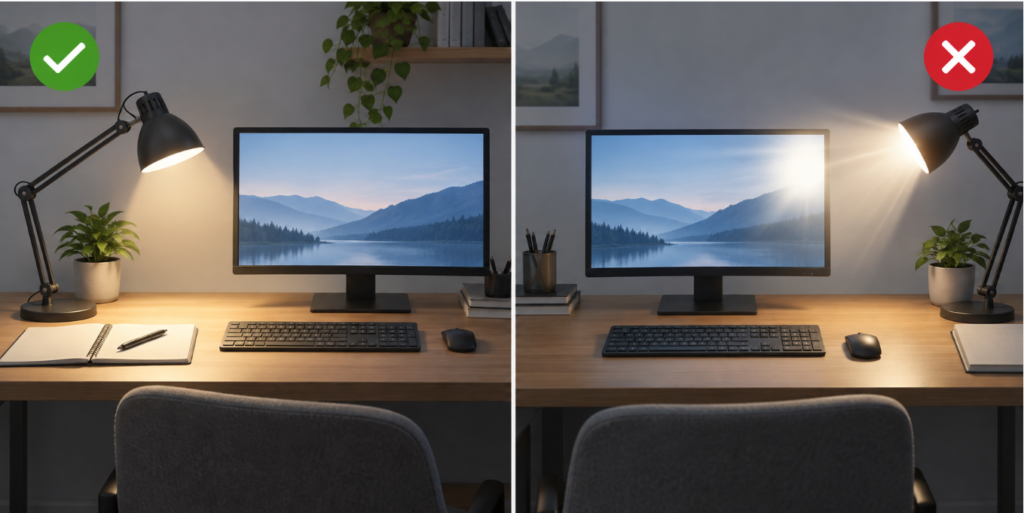
Control glare, not just brightness
Place the light so it illuminates the work surface without reflecting in the monitor. Asymmetric or angled light can help, but positioning still matters. Your screen should also sit at a comfortable level; see our guide to proper monitor height and our explanation of monitor viewing distance.
Use color temperature with purpose
Cooler white light can feel crisp for detailed daytime work, while warmer light is often more comfortable later in the evening. The useful feature is not the largest claimed range but the ability to reach a comfortable setting quickly and return to it.
Plan the entire workstation
A lamp cannot compensate for poor desk geometry. Start with a comfortable home-office desk height, then position the monitor, keyboard, and light around your neutral working posture. Our ergonomic home-office setup guide walks through the complete process.
Frequently Asked Questions
What color temperature is best for a home office?
A neutral white setting around the middle of a lamp’s range is a practical starting point for daytime work. Warmer settings may feel more comfortable in the evening. Personal comfort and room lighting matter more than one universal number.
Should a desk lamp be behind or beside the monitor?
Either can work if the light reaches the desk without shining directly into your eyes or reflecting in the screen. Overhead clamp lamps are often centered behind the monitor, while traditional lamps are commonly placed on the side opposite your writing hand to reduce shadows.
Is a clamp lamp better than a lamp with a base?
A clamp is better for saving desk space and reaching over monitors. A base is better when the desktop cannot accept a clamp or when you want to move the lamp frequently. The mounting surface should decide this choice before extra features do.
Can a desk lamp reduce eye strain?
Balanced room and task lighting may make the workspace more comfortable by reducing harsh contrast and reflections. A lamp is only one part of the setup; screen brightness, viewing distance, breaks, and monitor position also matter.
Choose by Mount, Reach and Controls
First eliminate lamps whose mounting and clearance requirements do not fit the desk. Then compare the remaining designs by reach and controls: articulated Micomlan bars, Syrinx’s wider arrangement, LitONES’s freestanding panel, Pzloz’s listed remote, Airlonv’s single bar or Lepro’s folding base-mounted design. We have not established a universal winner through measured light output, glare or comfort testing.
Before ordering, measure the desk, confirm that the mounting method works, and decide where the lamp will sit relative to the monitor. The right lamp is the one that covers your actual work area without adding glare or unnecessary complexity.