Best Under-Desk Cable Trays: 3 Practical Home Office Picks
The best under-desk cable trays are the ones that fit your desk, your connections, and the way you maintain them. A wide tray can be useful for several adapters, but it is a poor choice if its clamps collide with your monitor arm. A narrow screw-mounted tray may suit a permanent workstation while being unsuitable for furniture you cannot modify.
Affiliate disclosure: As an Amazon Associate, SmartNestLab earns from qualifying purchases. This comes at no additional cost to you. Links marked Amazon are affiliate links; the IKEA and VIVO website links are manufacturer references.
Quick answer: start with a compact clamp tray for a modest setup, compare a deeper clamp tray when you need more room, and consider a screw-mounted tray only when the desk manufacturer permits the installation. Measure the mounting area and the connected equipment before choosing a model.
This is a research-based buying guide, not a hands-on product test. The comparison uses the three linked U.S. manufacturer pages, rechecked October 29, 2026. The separate LOVJOYSE listing retains its October 23 identity check; the VIVO Amazon reference has its own identity and seller note below. This check covered product identity and published fit information, not a live price or delivery comparison. Our use-case selections are editorial judgments based on published specifications. The featured image is our original explanatory diagram, not a product photograph.
Quick Comparison: Three Under-Desk Cable Trays
| Product | Our use-case pick | Published mounting requirements | Published size and load limit |
|---|---|---|---|
| IKEA FÖRSÄSONG, white, 005.731.88 | Compact clamp option | Horizontal surface, 5/8–1 5/8 in. thick | 15 × 4 1/4 × 6 3/4 in.; 7 lb maximum load |
| VIVO DESK-CM6L-B | Deeper clamp option | Desktop thickness 0.2–2 in. | 17 × 6 × 5.8 in.; 8.8 in. including clamps; 11 lb capacity |
| VIVO DESK-AC06-1C series | Narrow screw-mounted option | Wood or particle board/MDF underside; verify desk approval | 16.5 × 3 × 4.5 in. each; mounting holes 11 in. apart; 11 lb capacity |
Dimensions are manufacturer-reported overall measurements, not guaranteed usable interior space. Check the exact variant, current instructions, and delivery availability before ordering. These are three options for different layouts, not a claim that one product is best for every home office.
1. IKEA FÖRSÄSONG: A Compact Clamp Option
The white FÖRSÄSONG tray is a small steel clamp-mounted organizer. IKEA specifies a 5/8–1 5/8-inch surface thickness, a 7-pound maximum load, and two included touch-and-close fastenings. Its published dimensions are 15 inches wide, 4 1/4 inches deep, and 6 3/4 inches high.
Why consider it: its compact footprint is a useful starting point for a modest workstation. Why pause: the limited depth makes plug and adapter fit especially important. Measure the equipment with its connectors attached, and check the edge profile rather than relying on thickness alone.
Our pick is for a small collection of cables and compatible light equipment where a removable clamp installation is preferred. Confirm that your actual items fit without crowding before choosing it. Check the current IKEA listing and instructions →
2. VIVO DESK-CM6L-B: More Published Depth for a Clamp Setup
The VIVO DESK-CM6L-B uses padded clamps and lists a 0.2–2-inch desktop thickness range. VIVO reports steel construction, an 11-pound capacity, and dimensions of 17 × 6 × 5.8 inches, or 8.8 inches including the clamps.
Why consider it: its published six-inch depth gives you more space to evaluate than the shallower options here. Why pause: the clamp assembly takes space of its own. Check for a rear apron, drawers, wall clearance, and nearby monitor-arm hardware. Overall dimensions do not prove a particular power strip will fit.
Our pick is for a compatible desk edge when a deeper removable tray addresses the remaining clutter. Check one-pack versus two-pack options carefully; do not assume the headline price covers two trays. Check the current VIVO listing and assembly manual →
3. VIVO DESK-AC06-1C Series: A Narrow Screw-Mounted Option
VIVO lists the DESK-AC06-1C series for mounting under wood or particle board/MDF desks. Each metal tray measures 16.5 × 3 × 4.5 inches, with mounting holes 11 inches apart and an 11-pound published capacity. The selected variant matters: DESK-AC06-1C is one black tray, DESK-AC06-2C is two black trays, and the corresponding white versions end in 1CW or 2CW. The page URL contains “2c” even when its selected offer is one black tray; check the variant and cart quantity.
Why consider it: screw mounting can avoid using the desk edge for another clamp. Why pause: it modifies the mounting surface, and the three-inch depth still requires a careful fit check. A desk material named on an accessory page does not automatically authorize drilling your furniture.
Our pick is for a permitted permanent installation with a narrow available route. Verify desktop construction, suitable fasteners, and mounting clearance with the exact desk and accessory instructions. Check the current VIVO listing and selected pack →
An Amazon Alternative From Our Desk Accessories Guide
Our home office desk accessories guide links to the LOVJOYSE black 25.3-inch clamp-on tray, ASIN B0FHGW9PZW. We retained the same affiliate link. This is a separate product, not an Amazon offer for any IKEA or VIVO tray above.
The Amazon listing identifies the selected size as 25.3 inches; the listing also offers a 15-inch option. We have not verified a separate manufacturer installation manual or usable interior measurements for this product, so it remains an additional listing to investigate rather than one of our three primary fit comparisons. Confirm the selected size, desk-edge compatibility, plug clearance, and installation instructions before ordering. Do not apply another tray’s load limit or dimensions to it.
Check the LOVJOYSE 25.3-inch tray on Amazon →
Before Shopping, Decide Whether You Need a Tray
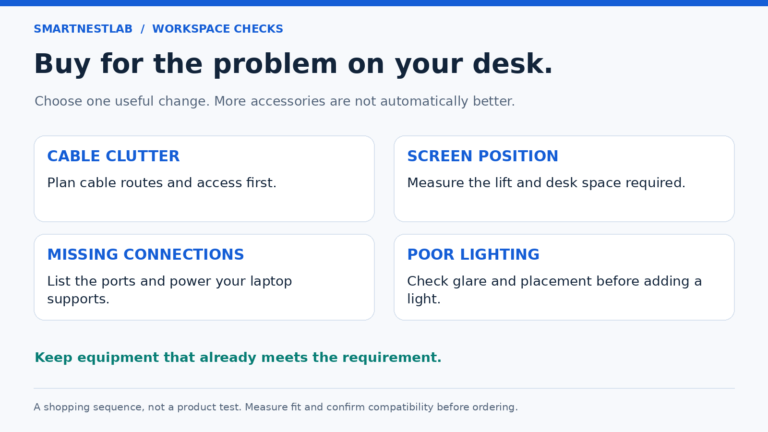
Remove cables for equipment you no longer use, then arrange the laptop, monitor, and input devices where you want them. If only two lightweight leads remain, a few reusable straps and compatible clips may solve the problem. Buying a large tray first can leave you organizing unused equipment instead of simplifying the desk.
Our home office cable management guide explains how to plan the route across the desktop, rear underside, and floor area. Use that sequence before choosing hardware. This article focuses on the purchase decision once you know what still needs support.
Make a short inventory: cables, adapters, and any power equipment the manufacturers allow you to place in an organizer. Record what stays connected and what you unplug daily. Equipment you need to reach frequently should not become difficult to access just because it is hidden beneath the desk.
Five Measurements That Matter More Than the Product Photo
1. The Actual Mounting Surface
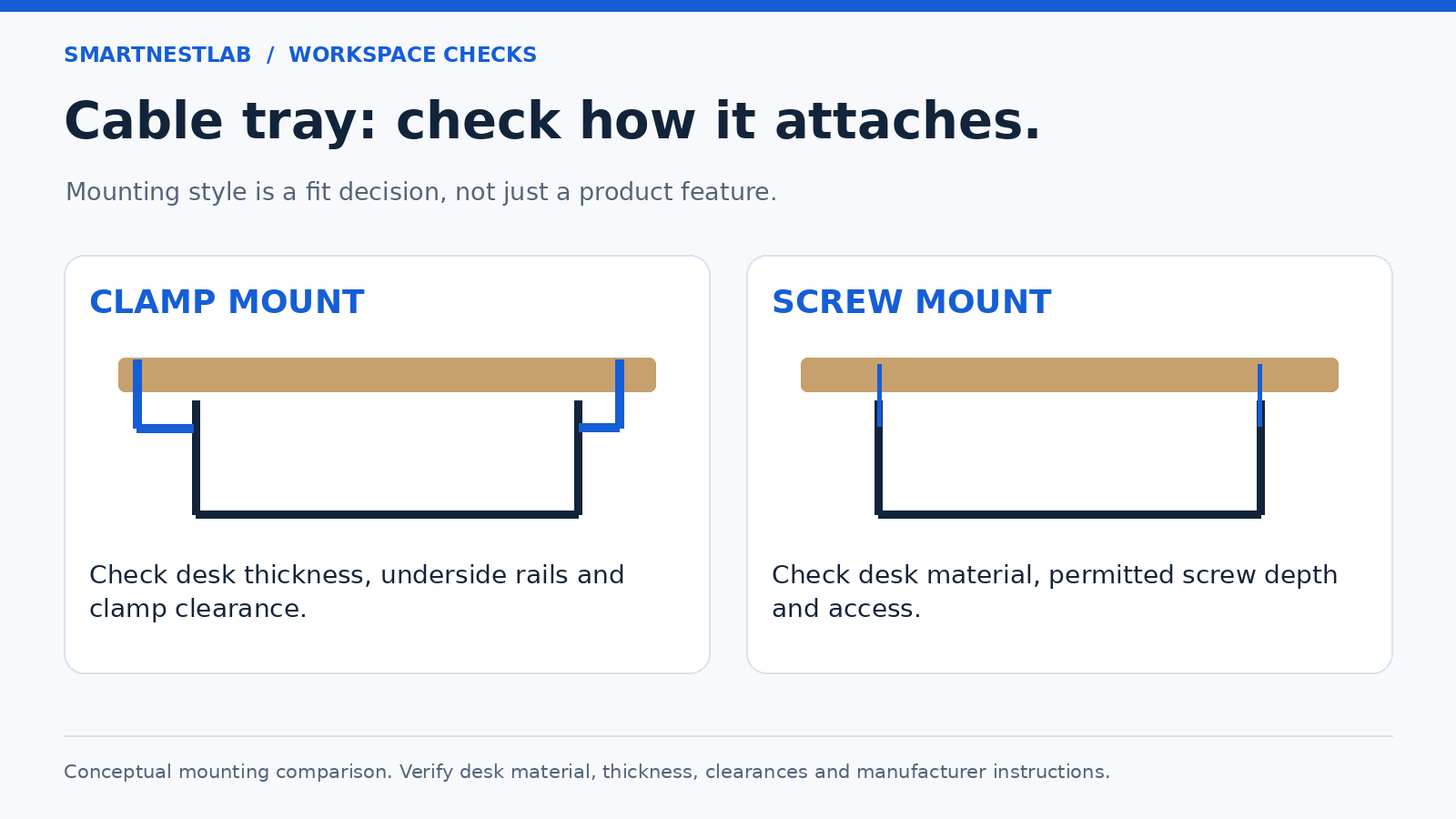
Measure the desktop thickness at the proposed attachment point. Include anything that changes how a clamp seats, such as a sloped edge, an apron, or trim. Leave room to assemble and tighten the hardware. A tray that appears compatible from the front may have nowhere to attach underneath.
For screw mounting, identify the desktop construction and ask the desk manufacturer about approved locations if the instructions are unclear. Do not treat glass, hollow-core furniture, or a thin panel as interchangeable with solid wood. Confirm suitable screw length before installation rather than improvising after a fastener reaches the top surface.
2. The Space Between Existing Hardware
Look for desk legs, frame rails, drawers, controllers, and monitor-arm clamps. Mark the space you can actually use. A paper outline of the organizer and its brackets can reveal a collision before you buy. Keep the tray away from the area your knees occupy while seated.
3. Equipment With Its Plugs Connected
Measure the full connected arrangement rather than the empty power strip or adapter alone. A side-facing plug, rigid connector, or large charger may change the space needed. Include room to disconnect equipment without forcing a bend or pulling on the cable. If fit is uncertain, request an interior measurement from the seller.
Illustrative fit check: suppose your connected power strip and plugs need 5 inches of depth. A tray advertised as 4 1/4 inches deep overall cannot accommodate that arrangement in the same orientation; a 6-inch overall depth is only a candidate until usable space and access are confirmed. These are hypothetical equipment measurements, not a fit test of the products above.
4. Total Supported Load
Check the exact organizer’s stated capacity and count everything you intend it to support. Do not assume that cables are the only load when adapters are sitting in the tray. Hardware fit, the desk surface, and correct installation also matter; a capacity figure cannot compensate for an unsuitable attachment point.
5. Access for Maintenance
Imagine replacing one monitor cable after the organizer is full. Can you reach its connector and release the relevant strap? Can you see the equipment labels and access switches? A slightly more visible arrangement can be more practical than a tightly packed one that must be dismantled every time a device changes.
Clamp-Mounted or Screw-Mounted: Which Should You Choose?
A clamp arrangement is worth considering when you want to reposition an organizer or avoid drilling. It still needs a compatible edge and enough room for the clamp assembly. “No drill” describes the attachment method; it does not mean universal desk compatibility or permission to attach to every material.
A screw-mounted arrangement may suit a stable layout where the desk edge is already occupied. Its tradeoff is a more permanent installation. If the desk belongs to a landlord, employer, or someone else, resolve permission before choosing this route. If the mounting details remain uncertain, use simpler supported routing while you check.
Whichever method you choose, arrange the workstation first. Our ergonomic laptop setup guide covers screen and input-device placement. Our USB-C hub vs docking station guide helps you decide which connections belong at the desk before you organize them.
Standing Desks and Power Equipment Need Separate Checks
A tray attached to a moving desktop does not solve the cable route to stationary equipment. Follow the desk manufacturer’s movement instructions, preserve appropriate slack, and inspect the route at both permitted height limits. Check that cables do not catch, tighten, or move connected devices when the desk or monitor arm changes position.
Keep adapters’ required ventilation and inspection access available. Use power equipment only as its manufacturer permits. The U.S. Fire Administration advises against overloaded power strips and against routing cords where they can be damaged or pinched, including under rugs. An organizer’s weight rating is unrelated to an electrical device’s power rating.
A Short Checklist Before You Order
- Have I removed unused connections and identified what needs support?
- Does the exact clamp range or approved screw installation fit my desk?
- Is there space for the tray, brackets, plugs, and nearby hardware?
- Will the connected equipment fit without crushing cables or blocking access?
- Have I checked the stated load limit and the permitted use of power equipment?
- Does the cable route work when the desk and monitor move?
- Am I buying the intended model, color, and number of trays?
- Have I checked current price, delivery costs, availability, and return terms?
For related workspace purchases, see our home office desk accessories guide, which contains affiliate links. You do not need to buy every organizer type: choose the smallest compatible setup that supports the equipment you actually use.
Frequently Asked Questions
Are Clamp-On Cable Trays Better Than Screw-Mounted Trays?
They solve different installation problems. A clamp needs a suitable edge and hardware clearance; a screw-mounted tray needs an approved mounting surface and appropriate fasteners. Choose by desk compatibility and your need to reposition the organizer.
Can Any Power Strip Go in an Under-Desk Tray?
No universal fit or mounting permission applies. Check the power strip’s instructions, the organizer’s intended use and load limit, plug clearance, and access to switches. Do not force equipment into a space that prevents safe use or inspection.
Should I Choose the Longest Tray Available?
Only if the remaining equipment needs the space and the mounting area can accommodate it. A long tray may compete with desk rails or other accessories. Overall length also says little about interior depth and usable connector clearance.
Which of These Three Is the Best Starting Point?
Use the compact clamp option as a starting point for a modest layout, compare the deeper clamp option for more room, and consider the narrow screw-mounted option for a permitted fixed installation. Your measurements and the exact instructions make the final decision.